


 featureFasting Tracker
SlimAI Intermittent Fasting Tracker with 6 Flexible Plans
Choose from 6 fasting plans, set your schedule, and keep fasting windows connected to meals, calories, water, and steps in one app.
A fasting timer tells you when to eat. It cannot tell you what happened when you did. SlimAI Calorie Tracker keeps intermittent fasting in the same app as your meals, calorie balance, water, and steps, so your eating window and your food choices stay part of one picture.
The Fasting Tracker offers 6 selectable plans, from a gentle 14:10 start to weekly low-calorie approaches like 5:2, with schedule setting and a built-in how-it-works guide. Eat smarter, not stricter.
Last updated

3-day free trial · Cancel anytime · No card charged during trial
Why Fasting Apps Fail Without Food Context
Most fasting apps are stopwatches. They count the hours you did not eat, then go quiet the moment your eating window opens — exactly when your decisions start to matter. Without food context, a "successful" fast can still end in a day that worked against your goal.
Running a separate fasting timer next to a separate food app also splits the habit. Two apps means two check-ins, and when the numbers live apart, you are left connecting eating windows to calories and hydration by memory.
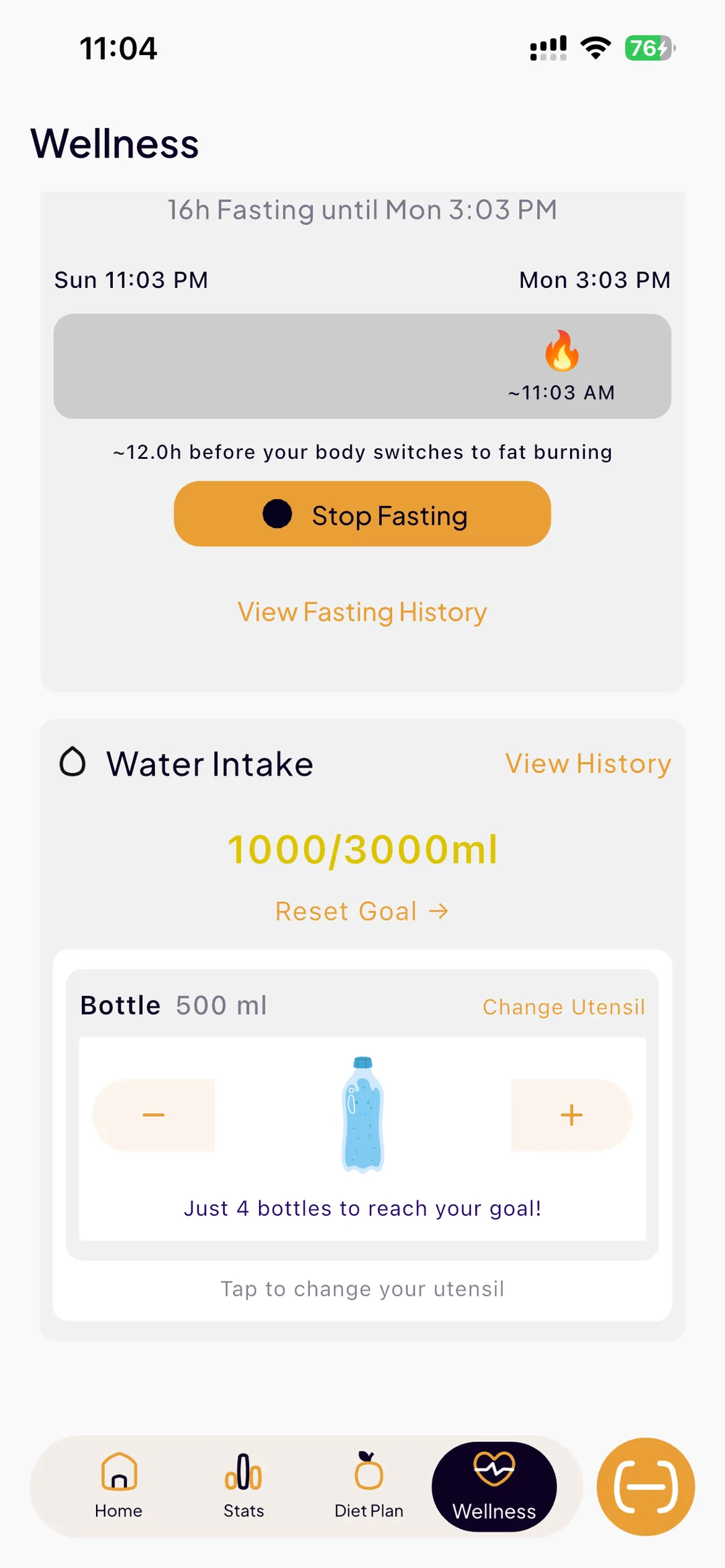
SlimAI Calorie Tracker puts intermittent fasting inside the same app as meal logging, your calorie goal, water tracking, and steps. Your fasting plan and your food log describe the same day, so you can see how the window and what you ate inside it fit together.
The 6 Intermittent Fasting Plans in SlimAI
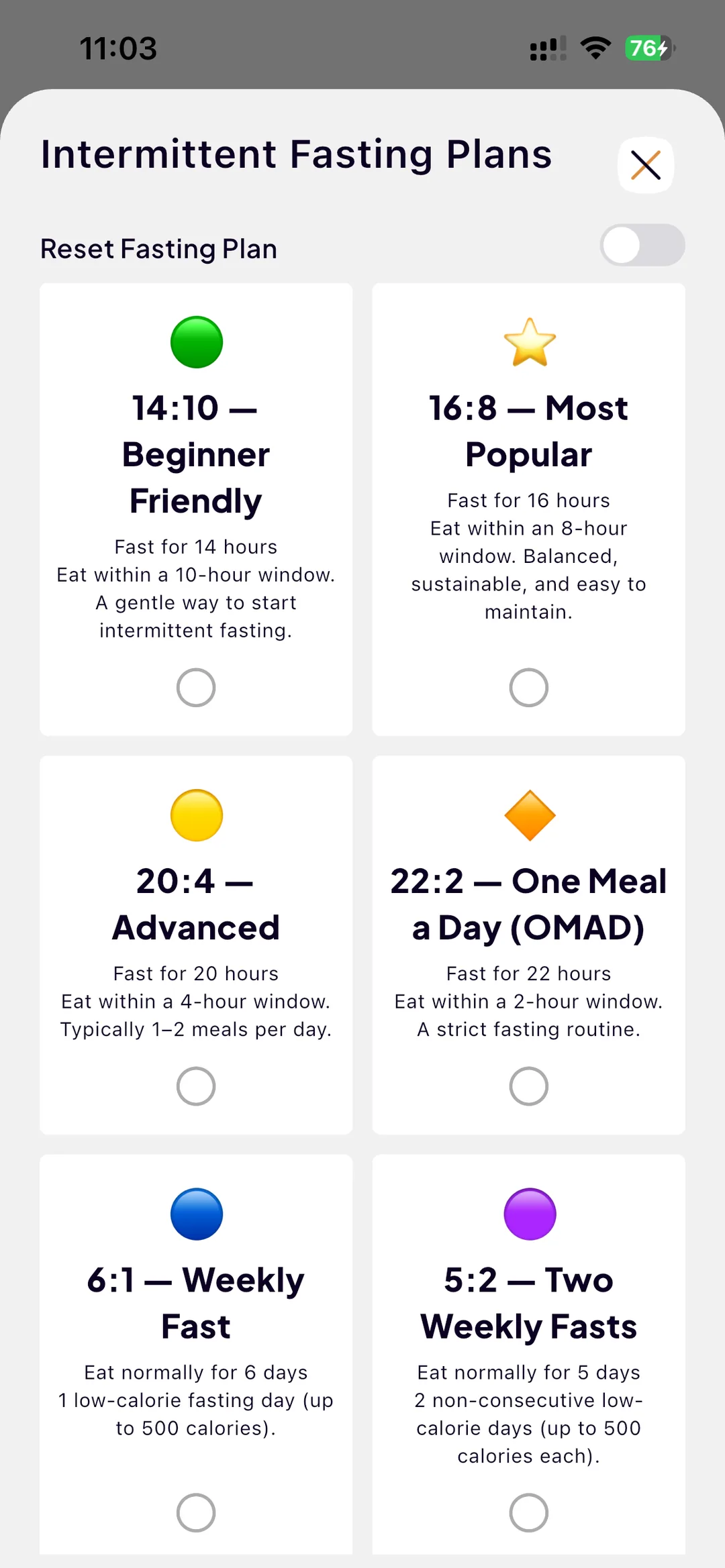
SlimAI offers 6 selectable fasting plans, so you can pick a rhythm that matches your experience level and routine instead of forcing one fixed window.
14:10 — Beginner Friendly
Fast for 14 hours and eat within a 10-hour window. A gentle start that shortens your eating day without a drastic change to your routine.
16:8 — Most Popular
Fast for 16 hours and eat within an 8-hour window. A balanced, sustainable rhythm and the most widely used intermittent fasting pattern.
20:4 — Advanced
Fast for 20 hours and eat within a 4-hour window, typically as 1-2 meals. A demanding schedule for people already comfortable with longer fasts.
22:2 — One Meal a Day (OMAD)
Fast for 22 hours and eat within a 2-hour window. A strict plan that condenses the day into one main meal.
6:1 — Weekly Fast
Eat normally for 6 days, then keep 1 low-calorie day of up to 500 kcal. A weekly approach instead of a daily window.
5:2 — Two Weekly Fasts
Eat normally for 5 days, then keep 2 non-consecutive low-calorie days of up to 500 kcal each. The classic 5:2 pattern, tracked inside your normal food routine.
Ready to try Fasting Tracker?
Snap a photo and SlimAI does the rest — 10K+ downloads on iOS and Android.
3-day free trial · Cancel anytime · No card charged during trial
Set a Schedule and Learn How Each Plan Works
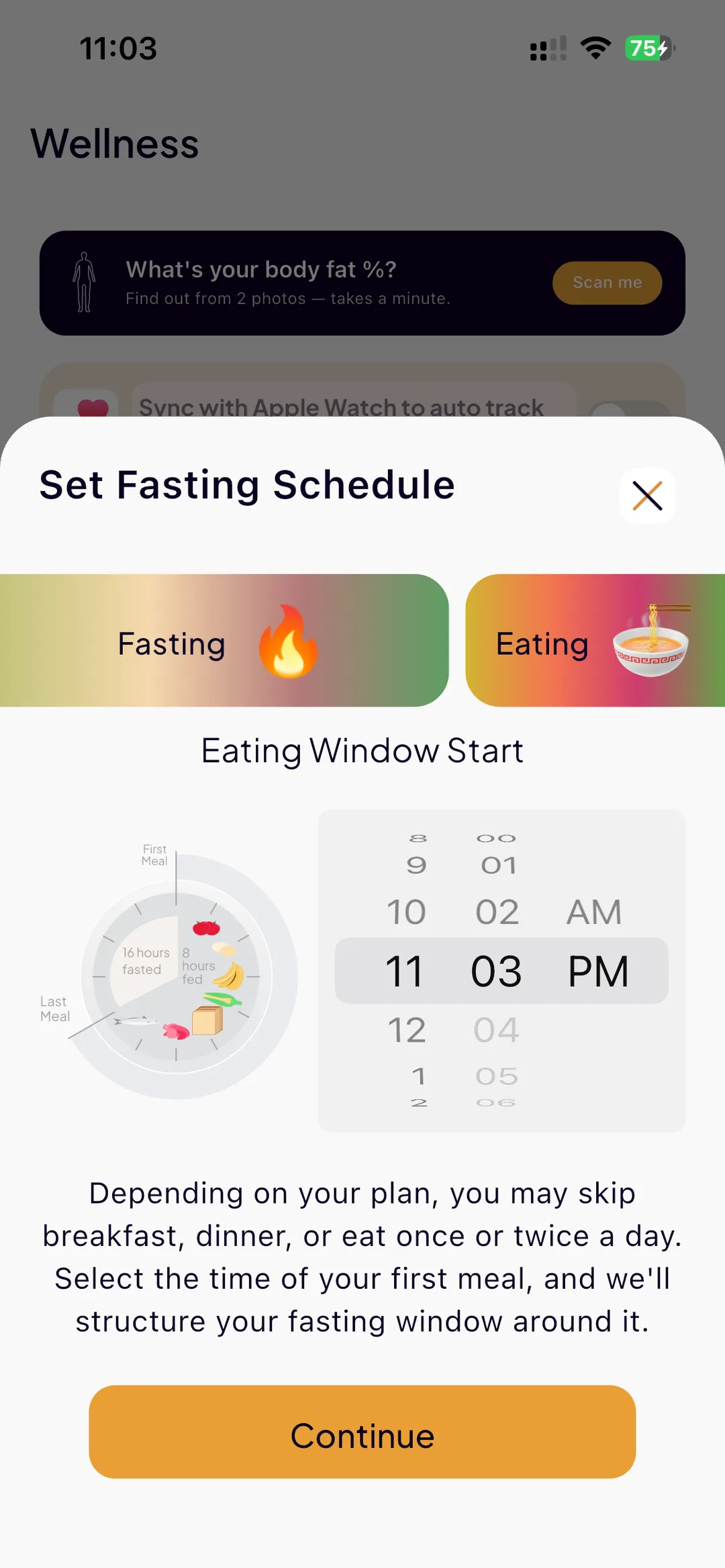
Picking a plan is only half the setup. SlimAI lets you set a fasting schedule around your actual day, so your eating window lands where your life allows it instead of where a default timer puts it.
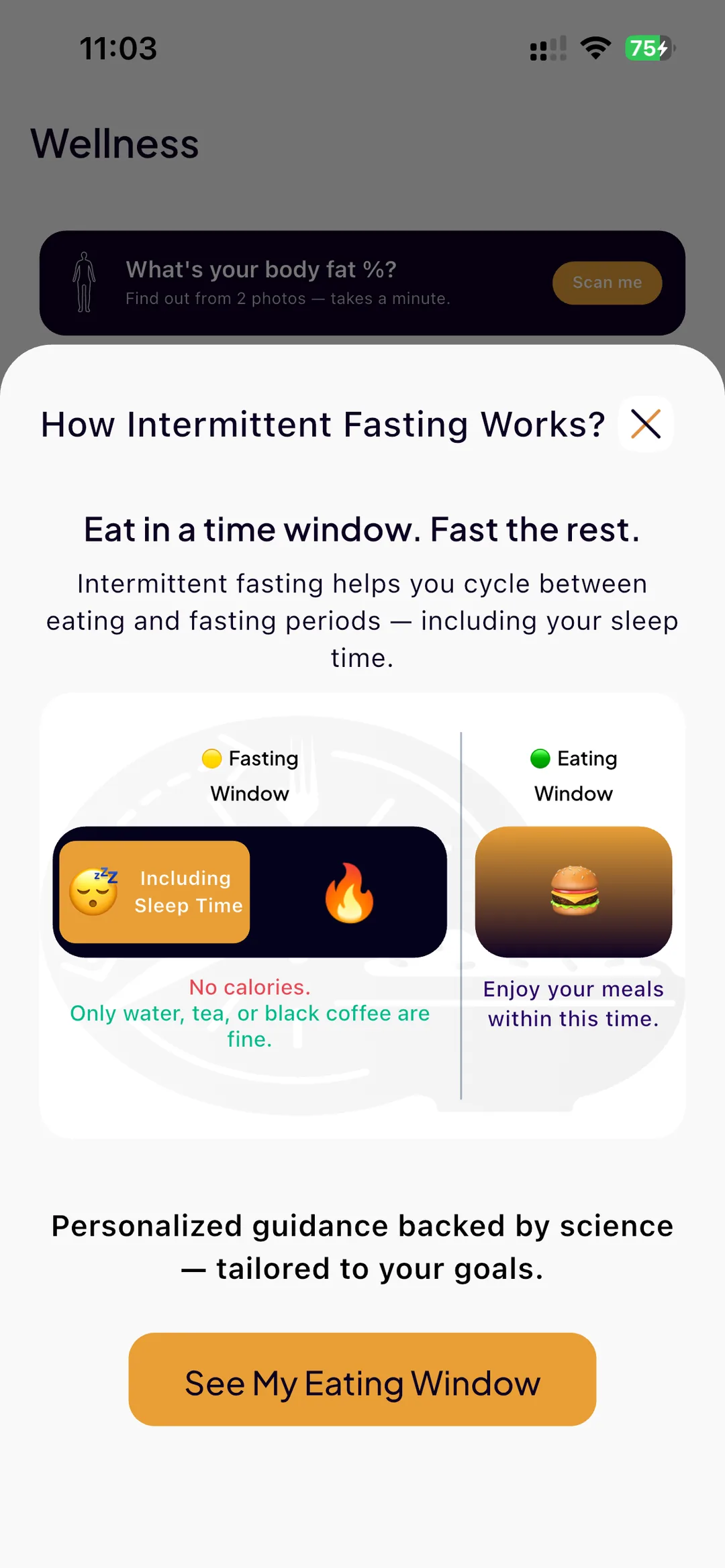
A built-in how-it-works guide explains what each plan involves before you commit, so you understand the fasting hours, the eating window, and what a low-calorie day means on the weekly plans. You start informed instead of guessing.
If a plan stops fitting your routine, you can switch. The point is a rhythm you can keep, not a streak you survive.
The Countdown Lives on Your Lock Screen
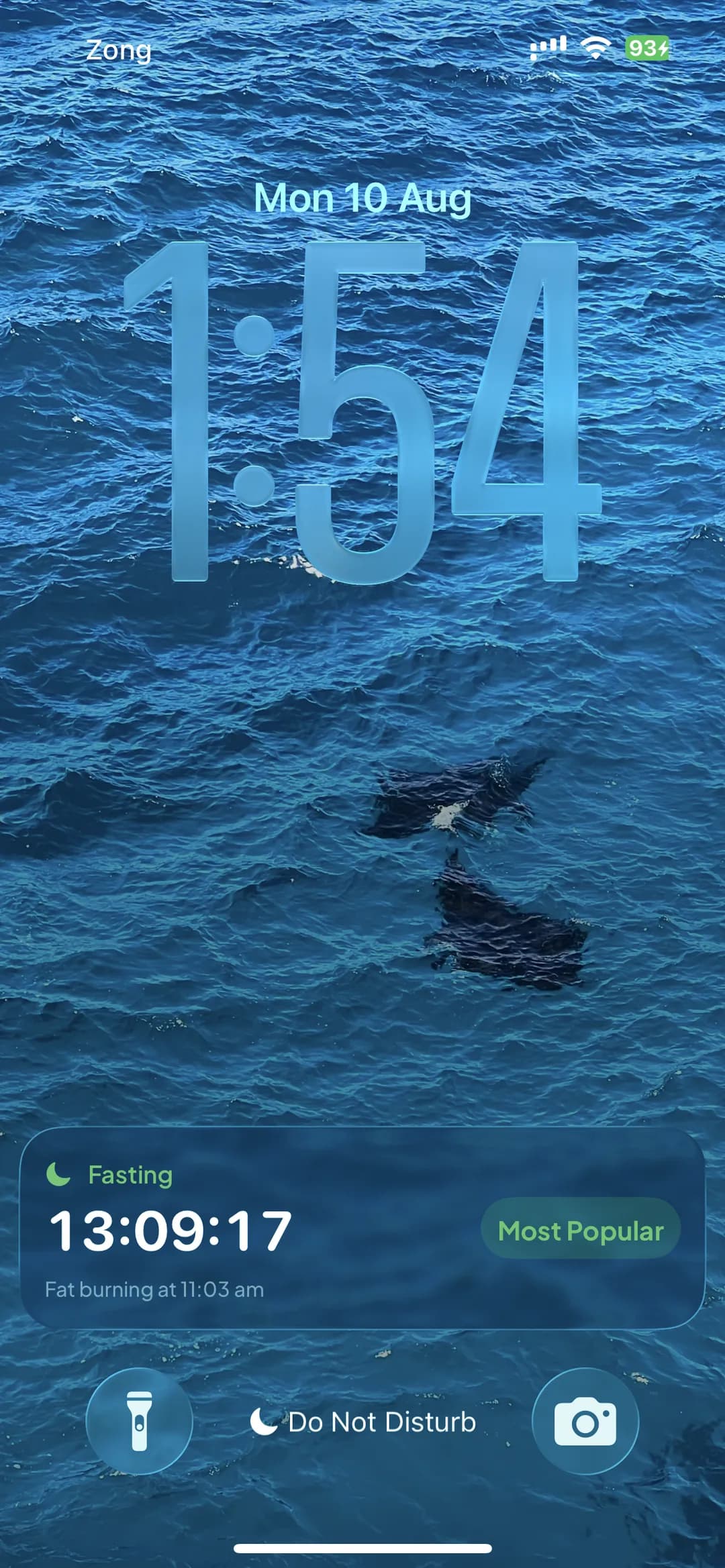
A fasting window is the one thing in a tracker that changes every second, and checking it is the reason people open a fasting app twenty times a day. SlimAI puts it where you already look: start a fast and it publishes a Live Activity to your iPhone lock screen and Dynamic Island, or an ongoing notification with a live countdown on Android.
It shows the time left in your window, the plan you are on, and the clock time your fat-burning phase starts — "Fat burning at 11:03 am" rather than a second countdown ticking toward another countdown. When that moment arrives the surface updates and an alert fires, so the milestone lands whether or not you are looking.
The platform ticks the timer itself. SlimAI hands it the two moments that matter — the end of your window and the start of fat burning — instead of waking the app every second to redraw a clock, which is what makes a sixteen-hour persistent countdown affordable at all. It has its own switch in settings, and turning it off during a fast removes it immediately rather than leaving it there for another fifteen hours.
Fasting, Calories, Meals, Water, and Steps in One App
Because the Fasting Tracker lives inside SlimAI Calorie Tracker, your fasting plan shares the app with everything else you track.
Meals logged in the same place
When your window opens, you log food in the same app that tracks your fast, so eating-window meals land in your calorie balance automatically.
Calorie context for low-calorie days
On 6:1 and 5:2 plans, calorie tracking shows how a low-calorie day is actually going, instead of leaving "up to 500 kcal" as a guess.
Water during fasting hours
Hydration matters most when you are not eating. The water tracker sits alongside your fasting plan, so drinking stays part of the same check-in.
Steps and workouts in view
Steps and logged workouts stay visible next to your fasting schedule, so activity and eating windows can be reviewed as one day.
Which Fasting Plan Fits You
There is no single right plan — the best one is the one you can repeat. And a note before you choose: fasting is not right for everyone. If you have a medical condition, are pregnant or breastfeeding, or take medication, consult a qualified health professional before starting intermittent fasting or making major diet changes.
With that said, a rough guide from gentlest to strictest:
New to fasting
Start with 14:10. It builds the habit of a defined eating window without a hard cut to your routine.
Ready for a steady rhythm
16:8 is the most popular plan for a reason: long enough to feel structured, flexible enough to sustain.
Prefer weekly structure over daily windows
6:1 or 5:2 keep most days normal and concentrate the change into one or two low-calorie days of up to 500 kcal.
Experienced fasters
20:4 and 22:2 (OMAD) are demanding schedules best suited to people who already know how longer fasts affect them.
Explore More SlimAI Features
 FAQ
FAQ
Still Wondering About SlimAI
 Which fasting plans does SlimAI support?
Which fasting plans does SlimAI support?SlimAI Calorie Tracker supports 6 intermittent fasting plans: 14:10 (Beginner Friendly), 16:8 (Most Popular), 20:4 (Advanced), 22:2 (One Meal a Day / OMAD), 6:1 (Weekly Fast with one low-calorie day up to 500 kcal), and 5:2 (Two Weekly Fasts with two non-consecutive low-calorie days up to 500 kcal each). You can set a schedule for your chosen plan and switch plans as your routine changes.
What is 16:8 intermittent fasting?
What is 16:8 intermittent fasting?16:8 means fasting for 16 hours and eating within an 8-hour window each day. It is the most popular intermittent fasting pattern because it is balanced and sustainable for many routines. In SlimAI, you can select the 16:8 plan, set your schedule, and log the meals you eat inside your window in the same app.
Does SlimAI support OMAD?
Does SlimAI support OMAD?Yes. SlimAI includes a 22:2 plan — One Meal a Day (OMAD) — where you fast for 22 hours and eat within a 2-hour window. It is a strict plan, so it suits experienced fasters. Because SlimAI also tracks calories and macros, you can see what your one meal actually contained.
Can I do 5:2 fasting with SlimAI?
Can I do 5:2 fasting with SlimAI?Yes. SlimAI supports the 5:2 plan: eat normally for 5 days and keep 2 non-consecutive low-calorie days of up to 500 kcal each. Since fasting and calorie tracking live in the same app, SlimAI shows how your low-calorie days are going instead of leaving the 500 kcal limit to guesswork.
Does fasting work with calorie tracking in SlimAI?
Does fasting work with calorie tracking in SlimAI?Yes, and that is the point of keeping them together. Your fasting plan and your food log live in one app, so meals eaten inside your window land in your daily calorie balance, low-calorie days on 6:1 and 5:2 plans have real numbers behind them, and water and steps stay part of the same routine.
Can SlimAI tell me whether fasting is actually working for me?
Can SlimAI tell me whether fasting is actually working for me?It can tell you what your own data shows. Because fasting, food, water, activity, and weight all live in the same app, SlimAI compares your completed fasting days against your non-fasting days once you have at least 3 of each, and reports the difference it observed with the sample size attached. It is phrased as a pattern in your log, not proof of cause — sleep, stress, and many other factors are not in the comparison. Cross-feature health patterns are part of SlimAI Pro.
Can I see my fasting timer without opening SlimAI?
Can I see my fasting timer without opening SlimAI?Yes. Starting a fast publishes a Live Activity to your iPhone lock screen and Dynamic Island, or an ongoing notification with a live countdown on Android. It shows the time left in your window, the plan you are on, and the clock time your fat-burning phase begins, and it updates with an alert when that phase starts. The countdown is ticked by the operating system rather than redrawn by the app, so a sixteen-hour fast costs almost nothing in battery. It has its own switch in Profile settings, and turning it off mid-fast removes it straight away.
Is intermittent fasting safe for everyone?
Is intermittent fasting safe for everyone?No. Intermittent fasting is not suitable for everyone. If you have a medical condition, a history of disordered eating, are pregnant or breastfeeding, or take medication, consult a qualified health professional before starting a fasting plan or making major diet changes. SlimAI provides tracking tools, not medical advice.
Start logging smarter with AI Meal Logging.
Log any meal, any way. Get instant calories and macros. Build the habit that sticks.
Free 3-day trial, then $7.99/month or $29.99/year. Cancel anytime.
- 50K+ food items in the food database
- 10K+ downloads on iOS and Android
- 7 languages
- 4.5★ App Store · 4.8★ Google Play (as of September 3, 2026)