


 featureWorkout Tracking
SlimAI Workout Tracking for Food, Fitness, and Progress in One App
Log workouts, see estimated burned calories in your daily calorie balance, and keep steps, meals, and progress connected in one routine.
Food logging shows what came in. Workout tracking shows what you did with it. SlimAI Calorie Tracker keeps both in one app, so logged workouts, estimated burned calories, steps, and meals stay part of the same daily calorie balance.
Workout Tracking connects exercise logging, burned-calorie estimates, step counting, workout suggestions, and progress review, so movement supports your food routine instead of living in a separate app. Eat smarter, not stricter.
Last updated

3-day free trial · Cancel anytime · No card charged during trial
Why Separate Fitness and Food Apps Break Consistency
Many people log meals in one app and workouts in another. The two never meet, so the daily picture stays split: one app says what you ate, another says what you did, and neither shows the full balance.
Split tracking adds friction. Every extra app is another login, another habit to maintain, and another place where a missed day turns into a dropped routine. When the numbers live apart, comparing intake with activity means doing the math yourself.
SlimAI Calorie Tracker is an AI calorie tracker and health and fitness app that brings calorie counting, macro tracking, workout tracking, and body assessment into one place. Workouts and meals feed the same daily calorie balance, so one habit covers both sides of the day.
How Workout Tracking Works in SlimAI Calorie Tracker
SlimAI Calorie Tracker's Workout Tracking keeps exercise connected to the places where you already review food: the calorie dashboard, your calorie goal, Progress, and Insights.
Log workouts alongside meals
You can add workouts inside SlimAI the same way you add food, so exercise entries sit next to logged meals instead of in a separate fitness app.
Burned calories in your calorie balance
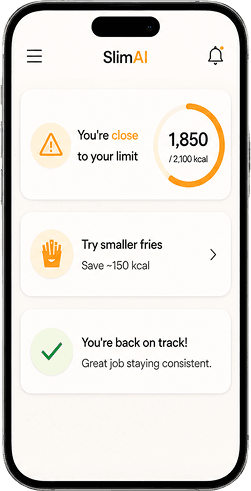
When you log a workout, SlimAI reflects estimated burned calories in your daily calorie balance, so the dashboard shows intake and activity together instead of calories eaten alone.
Workout suggestions when you go over your goal
If your day moves past your calorie goal, SlimAI can suggest workouts, so you have a practical next step instead of writing the day off.
Step counting
SlimAI tracks steps as part of your daily activity, so everyday movement stays visible alongside logged workouts and meals.
Back-date exercise logging
Forgot to log yesterday’s workout? Back-date exercise logging lets you add it later, so your history stays complete and a missed entry does not break your routine.
Ready to try Workout Tracking?
Snap a photo and SlimAI does the rest — 10K+ downloads on iOS and Android.
3-day free trial · Cancel anytime · No card charged during trial
How Logging a Workout Works
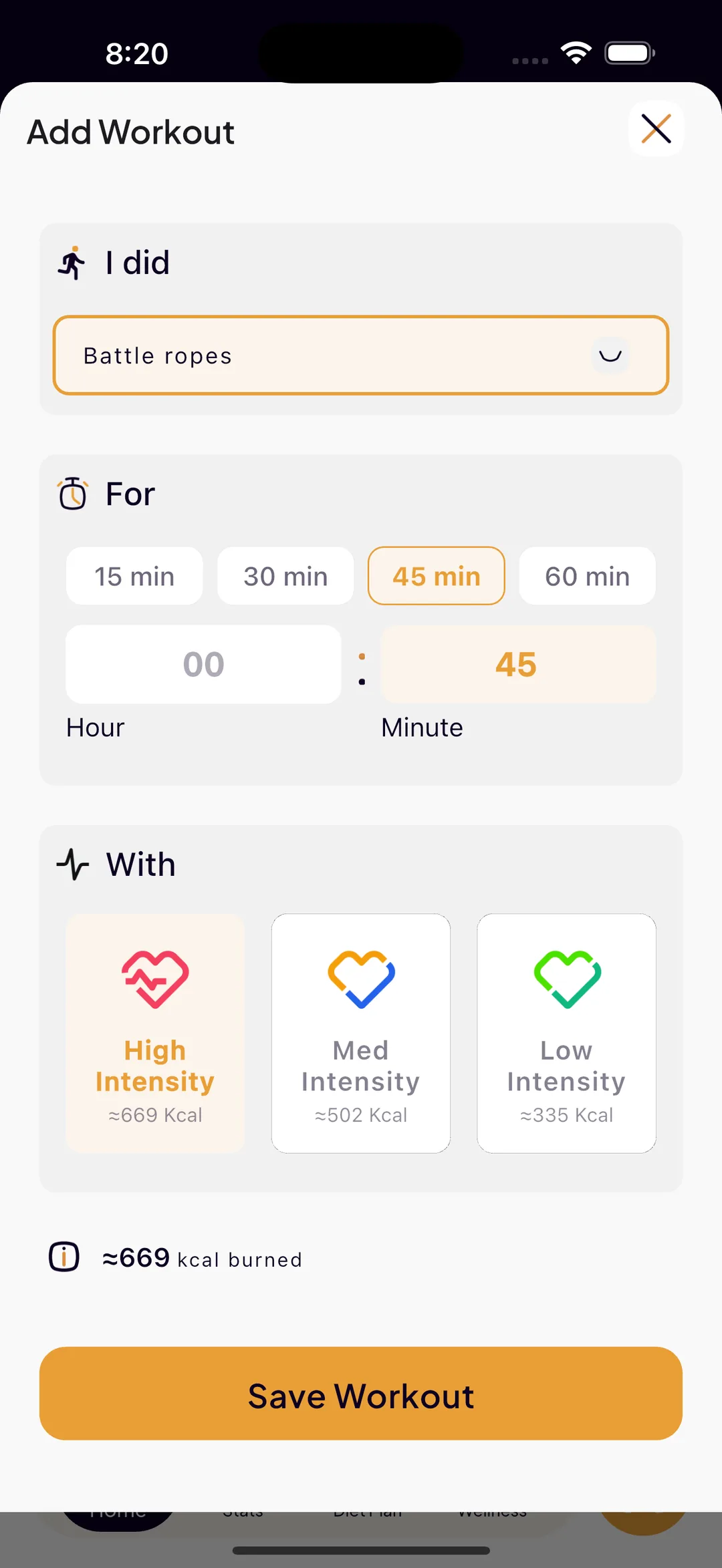
Adding a workout in SlimAI reads like a sentence instead of a form. You fill in three blanks and save: "I did" the exercise, "For" a duration, "With" an intensity.
The first blank opens a searchable exercise library, so you can find the movement by name instead of scrolling a long list. Arnold Press, Barbell Rows, Battle ropes, Bench press, Bicep Curls, Box jumps, Cable Crossovers, Calf Raises, and Chest Fly are all in there, alongside many more, so gym sessions, conditioning work, and bodyweight movements can each be logged as themselves.
The second blank is duration, entered as hours and minutes, so a 12-minute finisher and a 90-minute session are both easy to record accurately. The third blank is intensity: High, Med, or Low. Then you tap Save Workout and the entry joins your day.
Duration and intensity together drive the estimated calories burned for that entry. A longer session at high intensity produces a larger estimate than a short session at low intensity, which is why SlimAI asks for both instead of assuming an average effort.
That estimate then flows into your daily calorie balance, so the dashboard shows calories eaten, your goal, and calories burned side by side rather than intake alone. Logging a workout changes the same number you check when you decide what to eat next.
Burn numbers are estimates, not measurements. A "Learn how we suggest — Sources & References" link sits with the workout flow and opens an in-app screen explaining how the burn estimates are produced, so the number has a disclosed basis you can read rather than a figure you are asked to trust blindly.
"I did" — searchable exercise library
Search the library by name and pick the movement you actually performed, from Arnold Press and Bench press to Battle ropes, Box jumps, and Calf Raises.
"For" — hours and minutes
Enter the duration in hours and minutes, so short sessions and long ones are both logged as they happened instead of rounded into a preset block.
"With" — High, Med, or Low intensity
Pick the effort level for that session. Intensity sits beside duration in the burn estimate, so an easy session and an all-out session are not treated the same.
Save, and it lands in your daily balance
Saving the workout adds the estimated calories burned to the day, where they appear next to calories eaten and your calorie goal on the dashboard.
Sources & References for burn estimates
The same "Learn how we suggest — Sources & References" link available for food estimates covers workouts, so the method behind an estimated burn is disclosed in the app.
Connected Habits: Water, Fasting, and Steps
Workout Tracking sits inside a wider set of daily habits in SlimAI Calorie Tracker.
Movement rarely stands alone. Hydration, eating windows, and everyday steps shape the same day your workouts do, so SlimAI keeps them in the same routine.
Water tracking
Log water alongside workouts and meals, so hydration stays part of the same daily check-in instead of another forgotten habit.
Fasting awareness
If you follow an eating window, SlimAI keeps fasting context in the same app as your food and workout entries, so you can review the day as one picture.
Steps as a daily baseline
Steps give your day an activity baseline even when you skip a formal workout, so lighter days still count toward the routine.
Workouts and AI Body Assessment Progress
Logging workouts tells you what you did. AI Body Assessment adds context about where your body may be heading.
SlimAI Calorie Tracker’s AI Body Assessment provides estimates, not medical measurements. It gives you a consistent reference point you can revisit over time, so workout consistency and body estimates can be reviewed side by side.
Used together, Workout Tracking and Body Assessment turn exercise from a list of past sessions into part of a longer progress story: you can see the workouts you logged, the estimated burned calories they contributed, and how your body estimates change across weeks.
No single workout decides your progress, and SlimAI does not promise outcomes. What it offers is one connected view, so you can judge your own trend with more context and less guesswork.
Who Workout Tracking Is For
Workout Tracking is built for people who want food and fitness in one routine, not athletes-only training software.
People working toward a weight goal
See estimated burned calories reflected in your daily calorie balance, so activity and intake stay part of the same decision.
People juggling too many apps
Log meals, workouts, water, and steps in one app, so consistency depends on one habit instead of four.
Casual movers
Steps and light activity count too. You do not need a structured training plan for Workout Tracking to be useful.
People rebuilding a routine
Back-date exercise logging and workout suggestions help you recover from missed days instead of restarting from zero.
More From SlimAI Calorie Tracker
Workout Tracking is one part of a connected tracking routine inside SlimAI Calorie Tracker.
AI Calorie Tracker
Keeps your calorie goal, logged meals, and estimated burned calories in one daily balance.
Macro Tracker
Shows protein, carbohydrates, and fats behind your calorie total, so food quality has context alongside activity.
AI Body Assessment
Adds estimate-based body composition context you can review next to your workout history.
Progress, Streaks & Back-Date Logging
Connects workouts, meals, and habits with history, streaks, and progress visibility over time.
Explore More SlimAI Features
 FAQ
FAQ
Still Wondering About SlimAI
 How do I log a workout in SlimAI?
How do I log a workout in SlimAI?Adding a workout reads like a sentence: "I did" the exercise, "For" a duration in hours and minutes, "With" High, Med, or Low intensity — then Save Workout. The exercise field opens a searchable library that includes movements such as Arnold Press, Barbell Rows, Battle ropes, Bench press, Bicep Curls, Box jumps, Cable Crossovers, Calf Raises, and Chest Fly, so you can log the movement you actually did instead of picking a generic category.
How does SlimAI estimate calories burned?
How does SlimAI estimate calories burned?The duration you enter and the intensity you choose (High, Med, or Low) together drive the estimated calories burned for that workout, which then flows into your daily calorie balance beside calories eaten and your goal. A "Learn how we suggest — Sources & References" link in the app explains how those burn estimates are produced. Burned calories are always an estimate, not an exact measurement, so treat the number as context for your day rather than a precise figure.
Is SlimAI a workout app?
Is SlimAI a workout app?SlimAI Calorie Tracker is a health and fitness app built around calorie tracking that includes workout tracking. You can log workouts, see estimated burned calories reflected in your daily calorie balance, and track steps, so food and fitness stay in one app instead of two.
Does SlimAI track burned calories?
Does SlimAI track burned calories?Yes. When you log a workout, SlimAI Calorie Tracker reflects estimated burned calories in your daily calorie balance. Burned-calorie numbers are estimates, not exact measurements, so treat them as context for your day rather than a precise figure.
Can I log workouts and food in one app?
Can I log workouts and food in one app?Yes. SlimAI Calorie Tracker keeps meal logging and workout logging together, so your daily calorie balance shows intake and activity in one place. You do not need a separate fitness app to see how workouts affect your day.
Does SlimAI suggest workouts?
Does SlimAI suggest workouts?Yes. When your day goes over your calorie goal, SlimAI can suggest workouts, so you have a practical option for balancing the day. Suggestions are optional context, not requirements, and you decide what fits your routine.
Can I backdate a workout?
Can I backdate a workout?Yes. Back-date exercise logging lets you add a workout you forgot to log, so your history stays complete. A missed entry does not have to break your streak or your view of the week.
Does SlimAI count steps?
Does SlimAI count steps?Yes. SlimAI Calorie Tracker tracks steps as part of your daily activity, alongside logged workouts, water, and meals. Steps give lighter days an activity baseline, so everyday movement stays visible even without a formal workout.
Can I log exercise in SlimAI?
Can I log exercise in SlimAI?Yes. Log a workout by type and duration and SlimAI estimates calories burned, or let steps and workouts sync from Apple Health or Health Connect. Logged exercise adjusts your calorie target for the day, so food and exercise sit in one balance rather than two apps.
Start logging smarter with AI Meal Logging.
Log any meal, any way. Get instant calories and macros. Build the habit that sticks.
Free 3-day trial, then $7.99/month or $29.99/year. Cancel anytime.
- 50K+ food items in the food database
- 10K+ downloads on iOS and Android
- 7 languages
- 4.5★ App Store · 4.8★ Google Play (as of September 3, 2026)