



feature Water Tracker
SlimAI Water Tracker for Daily Hydration Goals
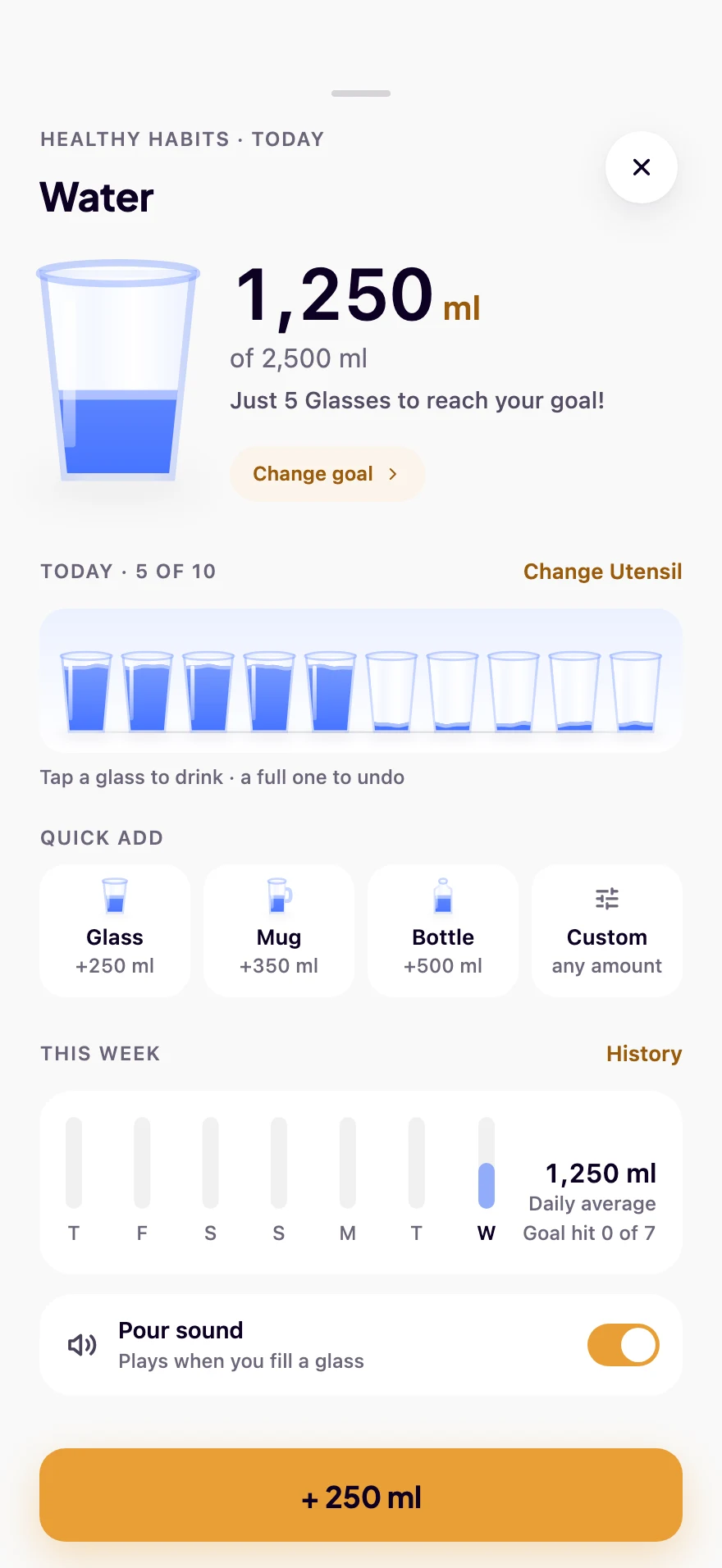
Your daily water goal shows as a row of glasses on Home. Tap one to drink, tap a full one to undo, and see at a glance whether you are on pace for the day.
Hydration is the easiest habit to intend and the easiest to forget. SlimAI Calorie Tracker puts water on the Home screen, directly under your meals, so logging a glass is one tap in the app you already open to log food.
The goal is drawn as the glasses it takes to reach it: a 2,500 ml goal with a 250 ml glass is ten glasses. Each tap fills one with a pour, a short pour sound and a light haptic. A pace pill tells you if you are on track, and a history sheet shows your daily average, days on goal and best streak. Eat smarter, not stricter.

3-day free trial · Cancel anytime · No card charged during trial
Last updated
In the app
How Water Tracker looks
1 · Your goal as glasses 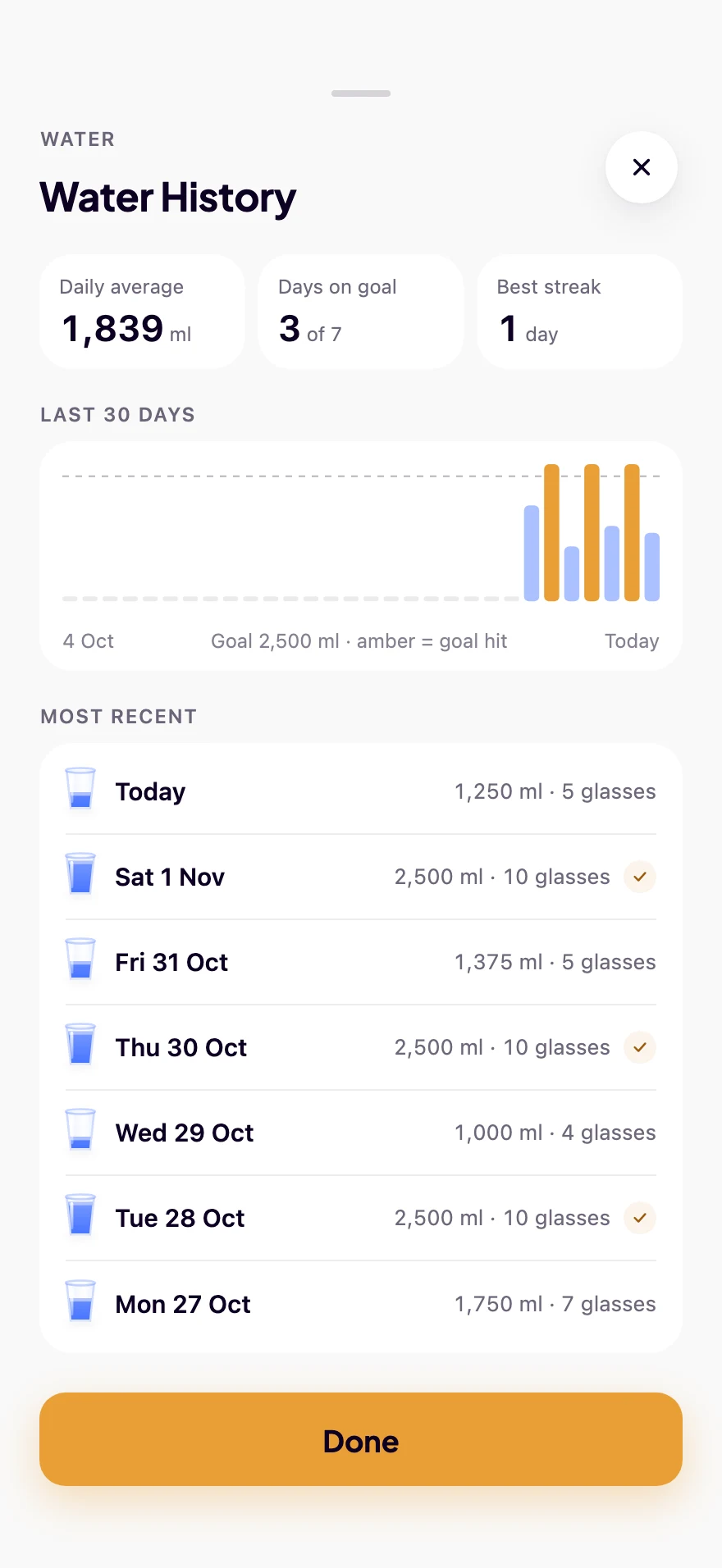
2 · Daily average, days on goal, best streak and 30 days of bars 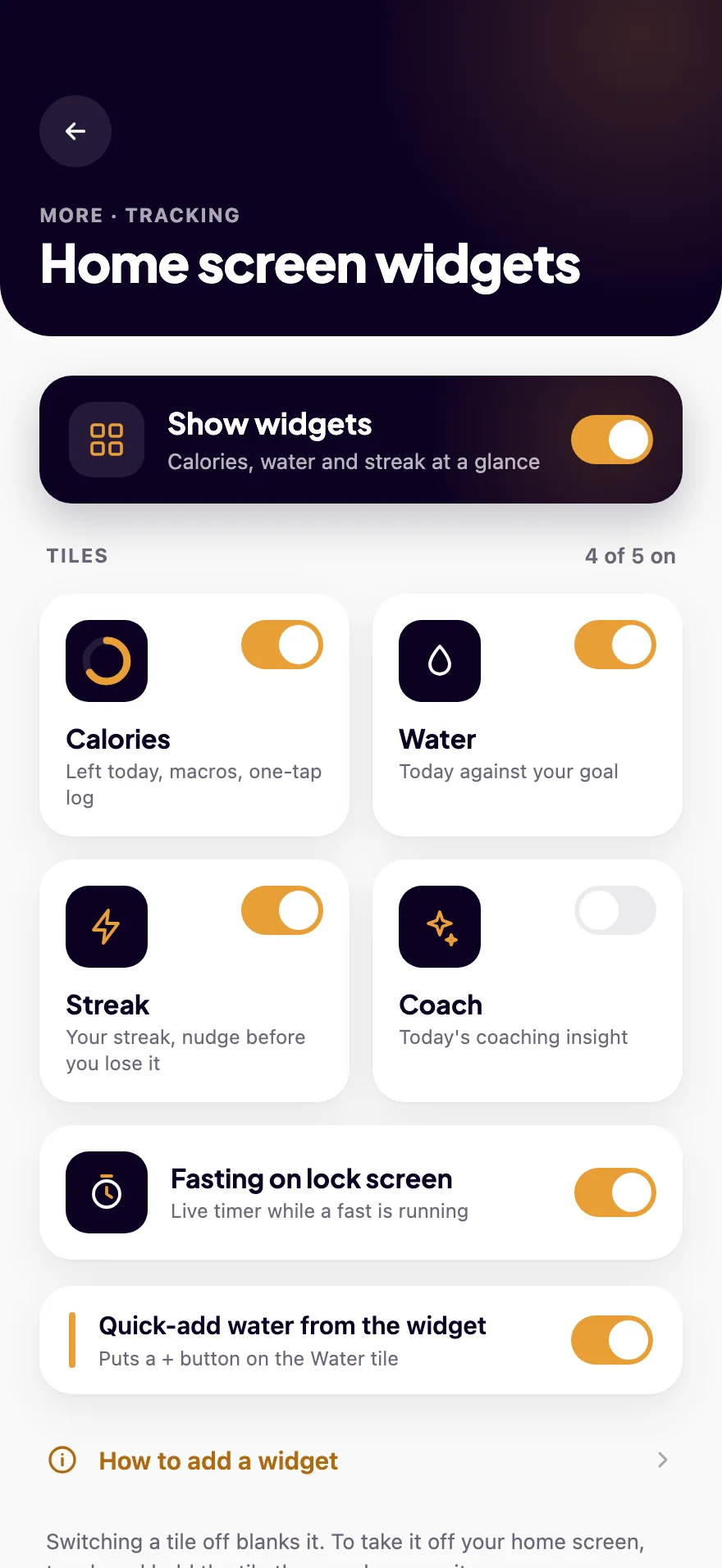
3 · Calories, water, streak and coach on your home screen
Why Hydration Tracking Gets Skipped
Almost nobody quits water tracking because it is hard. They quit because it is forgettable. A dedicated hydration app is one more icon to open, and a drink is the kind of small event that never feels worth the interruption of logging it.
The result is a habit that runs on guesswork: you know you drank "some" water today, but not whether it was close to enough, and yesterday is already gone.
SlimAI removes both problems. Water sits on Home next to your meals, so it gets logged in the check-in you were already doing, and logging it is a tap on a glass rather than a number to type.
Tap a Glass to Drink
The Water card shows your goal as glasses of the container you drink from. Tap an empty glass and it fills, along with any empty ones before it. Tap a full glass and one glass pours back out, with an Undo in case the tap was a mistake. Every tap saves the day’s new total straight away.
Once every glass is full, an amber extra glass appears for anything past your goal, so a hot day or a long workout is still counted.
Your goal, counted in glasses
The number of glasses is your goal divided by your container, rounded up: 2,500 ml in 250 ml glasses is ten. Up to ten sit on one row; past that the card suggests a bigger container.
A pace pill for the day
SlimAI spreads your goal evenly from 7 am to 10 pm and compares it with what you have logged. The pill reads On track, a number of glasses behind, or Done once the goal is met.
A pour you can hear
Filling a glass plays a short recording of water being poured, with a light haptic. The Pour sound switch turns it off, and on iPhone it follows the silent switch.
Read-only past days
Pick an earlier day on Home and you see that day’s total as grey glasses. Past days are for looking back; new drinks always go to today.
Glass, Mug, Bottle or Any Amount
Open the water sheet from the card for everything else. Quick add logs a Glass (250 ml), a Mug (350 ml) or a Bottle (500 ml) whatever container your glasses use, and Custom opens the container picker for any other amount.
Change Utensil sets what one glass on the card means: a glass, mug, bottle or jug, each with its own sizes. A 500 ml bottle turns a 2,500 ml goal into five bottles instead of ten glasses.
A Daily Goal That Starts From You
On first use, SlimAI suggests a daily goal from your profile and shows what it means in glasses. Set it with one tap, or open the goal sheet and change it in 250 ml steps between 1,000 and 4,500 ml, with four quick picks and your suggested amount one tap away.
If you want a number to start from, the free water intake calculator estimates a daily amount from your weight, activity and climate.
Water History: Average, Days on Goal, Best Streak
The water sheet shows this week as seven bars with your daily average and how many days hit the goal. Open History for the longer view.
Three numbers that matter
Your daily average, how many of the last seven days met your goal, and your best streak of goal days in a row.
The last 30 days
One bar per day against a dashed line at your goal. Days that reached it are amber, so a good week and a slipping one are easy to tell apart.
Recent days in glasses
Each recent day lists its total in millilitres and in glasses, with a tick on the days you reached your goal.
Hydration Alongside Meals, Fasting, and Workouts
Water rarely matters in isolation. It matters in the context of the rest of your day, and SlimAI keeps that context in one app.
Water with your meals
The Water card sits right under Meals on Home, so hydration joins the review you already do at meal times.
Water during fasting windows
If you follow one of SlimAI’s intermittent fasting plans, water is what carries you through fasting hours, and it stays tracked on the same screen as your fast.
Ask the AI Coach
Tap the sparkle on Home and ask "How much water should I still drink?" The AI Coach answers from today’s water and your goal, and can add water for you in one tap.
Water on your home screen
The SlimAI widget shows today’s water next to calories and can add a glass without opening the app.
FAQ
Questions, answered
How do I log water in SlimAI?
Tap a glass on the Water card on the Home screen. An empty glass fills, along with any empty ones before it, and the new total is saved straight away. You can also open the water sheet and use Quick add for a 250 ml glass, a 350 ml mug, a 500 ml bottle, or a custom amount.
How do I undo a glass of water in SlimAI?
Tap any full glass on the Water card. One glass pours back out and the total drops by that amount, and a message with Undo appears in case you tapped by mistake.
Can I change the glass size in SlimAI?
Yes. Change Utensil lets you pick a glass, mug, bottle or jug and its size. The glasses on the Water card then count in that container, so a 500 ml bottle turns a 2,500 ml goal into five bottles.
Can I set my own daily water goal?
Yes. SlimAI suggests a goal from your profile, and you can change it in 250 ml steps from 1,000 to 4,500 ml, pick one of four quick goals, or go back to the suggested amount with one tap.
How does SlimAI know if I am behind on water?
It spreads your daily goal evenly from 7 am to 10 pm and compares that pace with what you have logged so far. The pill on the Water card says On track, how many glasses you are behind, or Done once you reach the goal.
Can I turn off the water pour sound?
Yes. Use the Pour sound switch in the water sheet, or Sounds in the More tab under App; they are the same setting. On iPhone the sound also stays quiet when your phone is on silent.
Does SlimAI show my water history?
Yes. Water History shows your daily average, how many of the last seven days met your goal, your best streak, a 30-day bar chart against your goal, and your recent days in millilitres and glasses.
Why track water in the same app as food?
Because separate hydration apps get forgotten. In SlimAI the Water card sits under your meals on Home, so a glass gets logged in the same check-in as food, and your water, meals and activity describe the same day in one place.
Eat what you love.Stay on track anyway.
Log any meal, any way. Get instant calories and macros. Build the habit that sticks.
Free 3-day trial, then $7.99/month or $29.99/year. Cancel anytime.